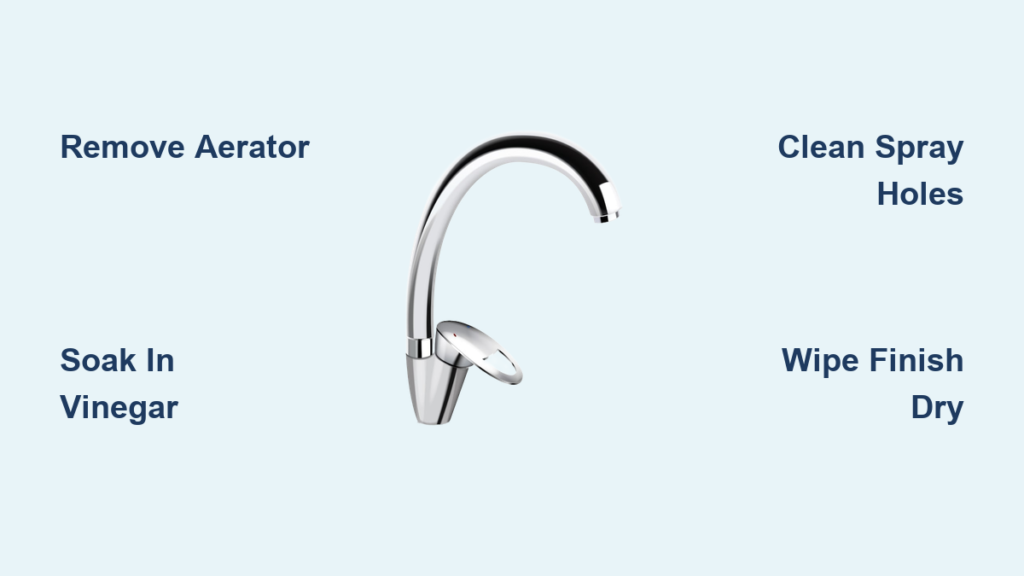
Is your Moen faucet not delivering hot water like it should? Does the handle feel loose, or does the sensor fail to respond after a battery change? You’re not alone. Thousands of homeowners face similar issues, often due to factory-restrictive settings, improper calibration, or minor mechanical looseness. The good news: adjusting a Moen faucet is a DIY-friendly task that takes 10 to 30 minutes with basic tools.
Whether you own a kitchen sink model, a PosiTemp shower valve, or an electronic touchless faucet, this guide delivers step-by-step instructions to fix temperature limits, recalibrate sensors, tighten handles, and prevent leaks safely and effectively.
Adjust Moen Shower Valve Temperature Limit
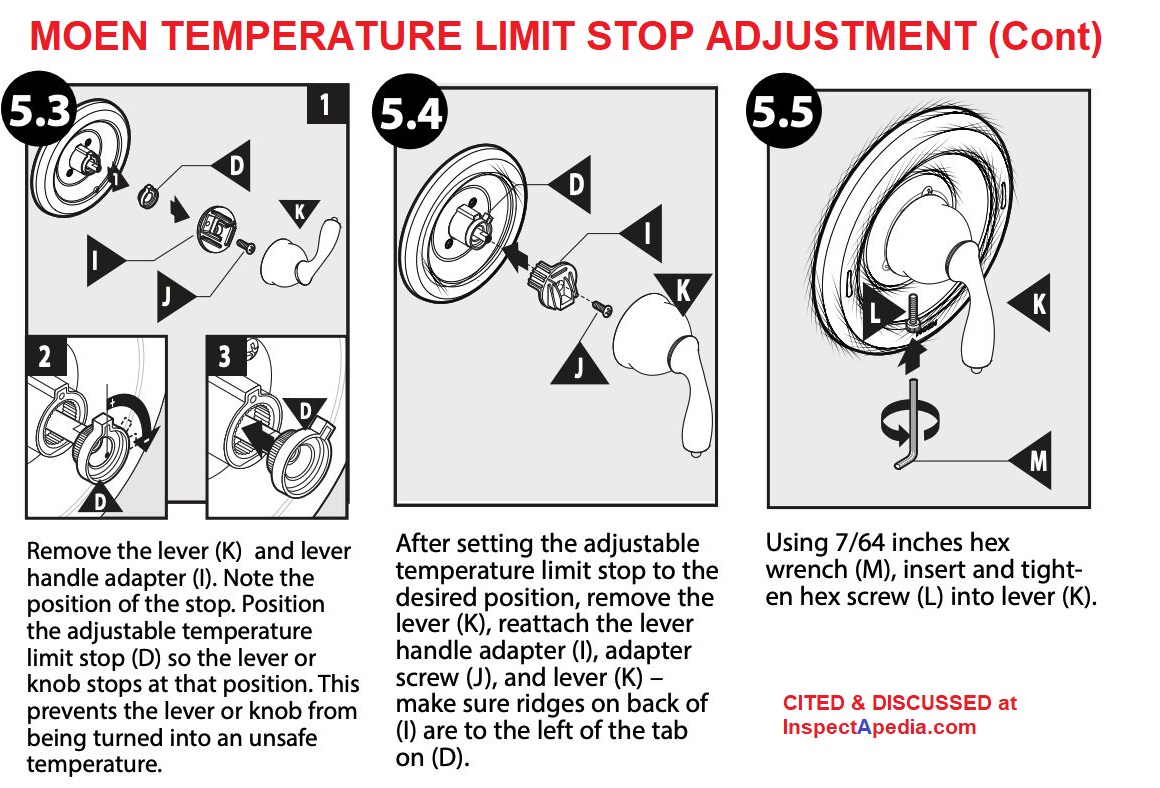
Moen PosiTemp shower valves come with a built-in temperature limit stop to prevent scalding. But this safety feature often restricts hot water too much, especially in larger homes. If your shower feels lukewarm even at full hot, you can easily increase the maximum temperature.
Locate the Temperature Limit Stop
After turning off the water supply, remove the handle using a 7/64-inch Allen wrench. Underneath, you will see the Key Stop, a notched metal or plastic piece controlling handle rotation. Inside it sits the temperature limit stop, a white or black plastic insert that blocks how far the handle can turn toward hot.
Increase Hot Water Output
Pull out the temperature limit stop and rotate it clockwise, then reinsert it into a lower notch (closer to the hot side). This allows the handle to turn further toward hot water. For maximum output, remove the white spline insert and rotate it so the spline aligns at 12 o’clock with the top notch. Reinstall the black plastic mounting piece and test the water.
Pro Tip: Always measure temperature with a digital thermometer. Do not rely on touch. Aim for 105 to 120 degrees Fahrenheit. Never exceed 120 degrees to avoid scalding.
Reduce Hot Water for Safety
If the water is too hot, pull out the limit stop and insert it into a higher notch (closer to cold). This reduces how far the handle can move toward hot. Reassemble and test again. Repeat adjustments until the desired temperature is reached.
Warning: Moen recommends not exceeding 120 degrees Fahrenheit. Check local plumbing codes before removing the factory-installed restrictor.
Fix Moen Kitchen Faucet Handle Issues
Loose, wobbly, or stiff handles are common in Moen kitchen faucets. These issues do not affect temperature but impact usability and longevity. Fortunately, they are simple to fix.
Tighten Handle Tension
Remove the decorative cap on the handle with a flathead screwdriver. Use a 7/64-inch Allen wrench to adjust the set screw underneath. Tighten slightly to reduce wobble. But do not over-tighten, as this can damage internal components or make the handle hard to turn.
Common Mistake: Over-tightening the set screw causes binding. Adjust in small increments and test after each turn.
Realign Handle Position
If the handle is not vertical when off, remove it by loosening the set screw. Rotate the handle to your preferred neutral position (usually straight up), then reattach and secure. Test full cold-to-hot movement to ensure smooth operation.
Note: Unlike shower valves, kitchen faucets do not have temperature limiters. Hot water control is fully manual.
Adjust Rotational Stop
Some pull-down or side-spray models have a rotational limit stop under the sink to prevent the spout from hitting cabinets or backsplashes. Loosen the stop screw, adjust the spout’s turning range, then retighten. This prevents hose kinking and improves usability.
Recalibrate Moen Electronic Faucets
After replacing batteries, Moen electronic faucets reset and may deliver only cold water or inconsistent temperatures. A quick handle calibration cycle restores full function.
Perform Post-Battery Calibration
Ensure hot and cold shutoff valves are fully open. Start with the handle in the cold position. Pull the handle forward to start water flow. Slowly rotate it through a full simulated 360-degree motion to hot. Pause 3 to 4 seconds at both full hot and full cold positions. Close the water and return the handle to start. Run hot water for at least 60 seconds to stabilize the system.
Plumber Insight: The handle does not physically rotate 360 degrees. This motion simulates a full sweep so the solenoid recalibrates correctly.
Set Sensor-Mode Temperature
The electronic control box under the sink has a temperature dial that sets the default mix for hands-free operation. Turn the dial clockwise to increase hot water. Turn counterclockwise to reduce heat. Handle must be off during adjustment. Otherwise, the system will not register the change.
Key Fact: This dial only affects sensor mode. Manual operation (pull forward equals cold, pull back equals hot) works independently and functions even without batteries.
Prevent Leaks by Securing Internal Components
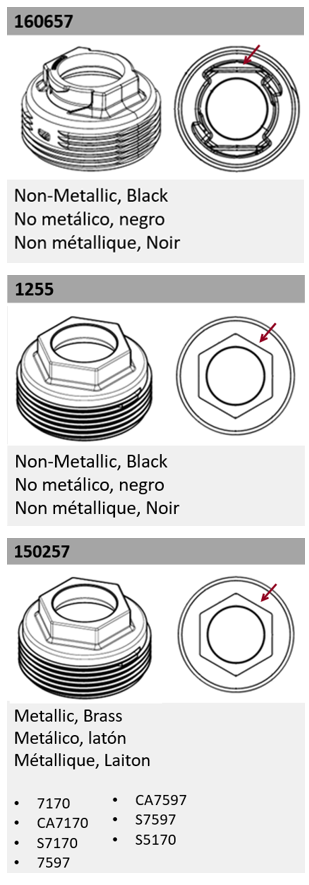
A leak at the base of the handle often is not a worn cartridge. It is a loose hex cap. Many Moen faucets ship with loose internal parts, especially in new installations.
Tighten the Cartridge Hex Cap
Remove the handle cap and loosen the Allen set screw. Lift off the handle to expose the cartridge. Use channel locks to firmly tighten the hex cap on top of the cartridge. Reassemble the handle.
Why It Matters: A loose cap allows water to seep between the cartridge and housing, causing base leaks. Tightening it eliminates the issue in most cases.
Secure the Spray Head Connection
For pull-down models, ensure the spray head is tightly connected to the hose. Use a crescent wrench to snug the connection. Avoid over-tightening, which can strip threads. Check periodically. Daily use can loosen the joint over time.
Pro Tip: Attach the spray head after installing the faucet to avoid strain on internal hoses.
Troubleshoot Common Moen Faucet Problems
Most faucet issues stem from simple causes that are easy to fix once you know what to check.
Water Too Cold at Full Hot
Cause: Temperature limit stop misaligned. Fix: Adjust stop to allow greater hot water access (see shower valve section).
Water Too Hot (Above 120 Degrees)
Cause: Restrictor removed or stop improperly set. Fix: Reinstall or reposition the temperature limit stop. Comply with local safety codes.
Handle Hard to Turn
Cause: Over-tightened set screw or mineral buildup. Fix: Loosen the screw slightly. If stiff, disassemble and clean internal parts.
Handle Wobbles
Cause: Loose set screw. Fix: Tighten securely but not excessively to eliminate play.
Weak or Intermittent Flow
Cause: Partially closed shutoff valves. Fix: Open both hot and cold valves fully under the sink.
Sensor Not Responding
Cause: Low battery or failed calibration. Fix: Replace batteries and perform the full 360-degree handle cycle.
Leaking at Handle Base
Cause: Loose cartridge hex cap. Fix: Tighten with channel locks. This resolves most base leaks.
No Hot Water After Battery Change
Cause: System reset. Fix: Recalibrate with the full handle motion and 3 to 4 second pauses.
Verify Adjustments with Performance Testing
Never assume an adjustment worked. Test it.
Measure Water Temperature
Place a digital thermometer directly in the stream at maximum hot. The ideal range is 105 to 120 degrees Fahrenheit. Adjust the limit stop if outside this range.
Check Handle Movement
Ensure the handle moves smoothly from cold to hot without binding or sudden jumps. On PosiTemp valves, cold starts at 6 o’clock, hot reaches 9 o’clock (counter-clockwise).
Repeat as Needed
You may need 2 to 3 adjustment cycles to hit the sweet spot. After each change, run water for 30 seconds or more and retest.
Use the Right Tools for the Job
Having the correct tools ensures safe, effective adjustments.
Essential Tools for Manual Faucets
7/64-inch Allen wrench removes handle set screws on most Moen models. #2 Phillips screwdriver opens trim and mounting hardware. Adjustable wrench secures mounting nuts under sink. Flathead screwdriver pries off decorative caps.
Tools for Electronic Faucets
Crescent wrench tightens spray head and hose connections. Channel locks secure cartridge hex cap to stop leaks. No tools needed for calibration. Just hand motion.
Testing Equipment
Digital thermometer confirms actual water temperature. Timer ensures 3 to 4 second pauses during calibration. Notebook tracks adjustments and results.
Note: No plumber’s tape or sealants are needed for standard adjustments unless resealing connections.
Maintain Your Moen Faucet Long-Term
Moen faucets are built to last, but a little maintenance prevents future issues.
Annual Checks
Inspect cartridge tightness. Clean spray head aerator monthly to prevent clogs. Replace batteries in electronic models every 1 to 2 years. Do not wait for failure.
Replacement Parts
If the temperature stop, spline insert, or cartridge cracks, replacement parts are available through Moen or authorized dealers. Most components are durable plastic designed for long-term use.
Warranty Coverage
Moen offers a limited lifetime warranty on leaks and mechanical defects. Keep your proof of purchase. Service may require it.
Expert Tip: Visit solutions.moen.com for model-specific guides, exploded diagrams, and part numbers.
Frequently Asked Questions About Adjusting Moen Faucets
How Do I Increase Hot Water Temperature on My Moen Shower Valve?
Remove the handle and locate the temperature limit stop inside the Key Stop. Pull out the stop, rotate it clockwise, and reinsert it into a lower notch (closer to the hot side). This allows the handle to turn further toward hot water. Test with a thermometer to confirm the desired temperature.
Why Is My Moen Touchless Faucet Giving Only Cold Water After Battery Change?
Electronic faucets reset after battery replacement. You must perform a calibration cycle. Start with the handle in the cold position, pull forward to start flow, rotate through a full 360-degree motion, pause 3 to 4 seconds at both extremes, then run hot water for at least 60 seconds.
What Causes a Loose Wobbly Handle on a Moen Kitchen Faucet?
The set screw under the decorative cap has likely loosened. Remove the cap with a flathead screwdriver, then use a 7/64-inch Allen wrench to tighten the set screw slightly. Do not over-tighten, or the handle will bind.
How Do I Stop a Leak at the Base of My Moen Faucet Handle?
Most base leaks stem from a loose cartridge hex cap. Remove the handle, expose the cartridge, and use channel locks to firmly tighten the hex cap on top. This eliminates water seepage between the cartridge and housing.
Can I Adjust the Water Temperature for Hands-Free Mode on Electronic Faucets?
Yes. Locate the electronic control box under your sink. Turn the temperature dial clockwise to increase hot water or counterclockwise to reduce it. The handle must be in the off position during adjustment, or the system will not register the change.
What Is the Maximum Safe Hot Water Temperature for Moen Faucets?
Moen recommends keeping hot water at 120 degrees Fahrenheit (49 degrees Celsius) or lower to prevent scalding. Use a digital thermometer to verify your settings after any adjustment.
Key Takeaways for Adjusting Your Moen Faucet
Adjusting a Moen faucet does not require a plumber. Whether you are fixing a lukewarm shower, recalibrating a sensor faucet, or stopping a leak, the solutions are straightforward and tool-light. The temperature limit stop on PosiTemp shower valves controls maximum hot water. Adjust it by moving the stop to different notches in the Key Stop. Electronic faucets need recalibration after battery changes. Perform the full 360-degree handle cycle with 3 to 4 second pauses at both temperature extremes. Most handle base leaks resolve by tightening the cartridge hex cap with channel locks. Follow these steps, use a thermometer to verify results, and enjoy reliable, safe water temperature control for years to come.